How to remove mods
While mods are great, you may want to remove or disable them if they crash your game. You can do so by following the steps below:
1. If you used legacy mods, remove BepInEx:
- Delete the BepInEx folder from your Documents\Timberborn directory.
- Delete the BepInEx from the game’s installation directory. If you run Timberborn through Steam, you can find the game’s installation directory by right-clicking the game in your Steam library and selecting Manage > Browse local files.
2. If you see the native mod manager when the game starts, uncheck all mods.
Keep in mind that simply reinstalling the game does not remove mods.
Comments: 8
Oldest
•
Newest
•
Most likes
•
Fewest likes
-
26 Nov, '24
DangerPawsHighlighted comment
Isn't this request redundant now? Surely it should at least be marked as solved. -
17 Nov, '23
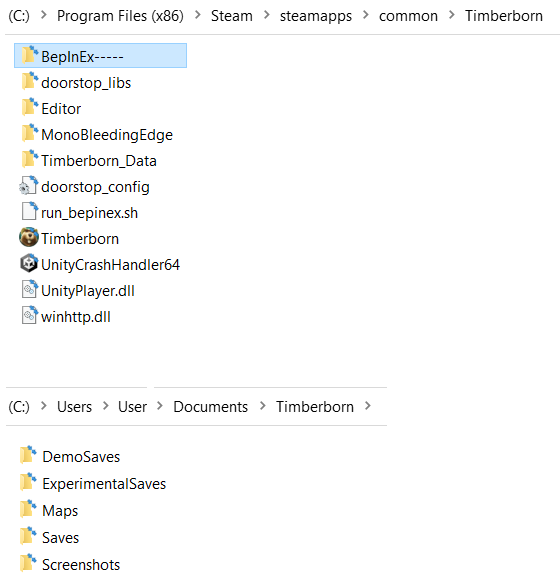
GunedhinBepInEx can be turned off simply by changing the folder name "BepInEx" to, for example, "BepInEx-----".
BepInEx won't start and the game will start normally.
When the problem Mod is removed or updated, rename the folder back.
1. The directory "C:\Users\User\Documents\Timberborn" does not contain anything from BepInEx.
-
04 Dec, '23
Knatte_AnkaCan also look at this guide: https://mod.io/g/timberborn/r/troubleshooting-mod-setup
or check pinned message in Discord/Modding-basics https://discordapp.com/channels/558398674389172225/1064824959697944666 -
18 Dec, '25
MelIs there a way to remove the mods if you don't have a bepinex folder? I've unchecked the boxes but would like to stop it showing up at the start completely as it makes it a bit slower to start the game. I can't remember how I installed them now so not sure how to get rid of them.
-
23 Mar
MikeeI have no BepinEx folder there so this answer is completely useless.
I know this is supposed to be an early release game, but I'm getting so tired of developers being in early access for years, taking our money, then changing things so much we have to do all the work to make the game playable again. It's lazy and dishonest. -
23 Mar
Gin Fuyou Admin@Mikee, game is out of early access already, and anyway I don't see what all this have to do with third-party mods you've manually installed on your own risk?
If you don't have bepinex, it's great, then you don't have to remove it... If you have a problem with the game, please start a topic with description of it and we'll try to help.