Unable to drag and move camera or selection with mouse button hold on Linux (Steam Deck)
I am unable to do any "click + drag" action. It began randomly and neither restarting the application nor restarting the computer help. I am able to right click on other windows and drag them as required.
I am on Fedora with Nvidia.
Comments: 51
Oldest
•
Newest
•
Most likes
•
Fewest likes
-
14 Nov, '25
Gin Fuyou SystemHighlighted comment
"Bug when right-click dragging" (suggested by <Hidden> on 2024-06-30), including upvotes (8) and comments (0), was merged into this suggestion. -
31 Oct, '25
Gin Fuyou Admin PinnedUpdate: issue is within Unity and Proton\Wine. Proton Experimental apparently have it fixed.
Game experimetal branch 1.0 doesn't have a workaround, you need to switch used Proton version.
Find the game in your Steam library -> right click -> properties -> compatibility (see attached screenshot)
upd: my bad screenshot didn't attach, but I hope most fellow linux user know where to find proton version selection anyway, but just in case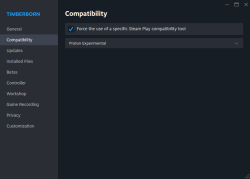
-
14 Nov, '25
Gin Fuyou Admin PinnedI've confirmed with devs - there are no plans to further address the issue. Proton Experimental has the fix.
If PE causes crashes for you - please share details in a *separate* topic and prepare *crash logs*. Devs doubt crashes are related to the dragging problem.
@ Kosovares
> Still not working on Steamdeck.
Please elaborate what is not working. -
30 Jun, '24
Ezeekey MergedWhen I use right-click, and drag, occasionally it will "let go" and i will need to click again to continue scrolling.
I am playing the game in Ubuntu 22.04 with a triple monitor setup. Lock cursor in window dose not fix problem. I do play with a fairly high mouse sensitivity
Bug can be recreated by holding right click at the center of the screen, then vigorously shaking the mouse. -
11 Oct, '25
CrazyMusketeer MergedSince one of the recent patches to experimental branch click and dragging (left and right click) doesn't work and results in a near instant unclick even with the button held.
Still works fine in the normal branch, and its not a OS issue because it works for everything else I've tested.
Trying to place a crop/tree just places a single tile.
Using the demolish tool just marks one tile.
Right click for camera movement will only shift the camera for a fraction of a second before stopping.
ect. -
14 Oct, '25
LarryMcJay MergedAfter the latest patch my mouse can no longer move my camera, I am on linux
-
14 Oct, '25
Racklinc MergedHello, today mouse camera controls are not working as well as click dragging tools such as paths or painting squares for mass demolition. I could still use tools such as making a path, but I had to do it one tile at a time. Current version is v0.7.10.13-a445513-sw. These features were working yesterday but are not today. I believe a hotfix rolled out and has caused the issue.
I could find the way to restore a version of the game to 0.6 and after going back to that version the camera and drag tools were working as expected. That version unfortunately is not compatible with my saved files versions.
Playing on Linux Mint using Steam but no Proton version. I did try Proton Hotfix to see if that made a difference and it did not. Attaching system info if it helps. Thanks! -
14 Oct, '25
steampowered.com MergedBug report as posted by B1-66ER on steam:
1. right click to pan camera doesn't work anymore. even when assigning the movement to my keyboard the camera doesn't pan it just rotates
2. then scrolling doesn't work. when in a menu i can't click and drag the scroll bar anymore
- this is save independent, other saves have the same issue and even restarting the game and system didn't fix it
- tried another mouse too and it's not that
yesterday i installed an update. problem started yesterday morning before the update and was still there after update. -
14 Oct, '25
Gin Fuyou System"Camera issues" (suggested by <Hidden> on 2025-10-14), including upvotes (1) and comments (0), was merged into this suggestion.
-
14 Oct, '25
Gin Fuyou System"Mouse camera controls and click dragging not working today- 2025-10-13" (suggested by <Hidden> on 2025-10-14), including upvotes (1) and comments (0), was merged into this suggestion.
-
14 Oct, '25
Gin Fuyou System"[Experimental] right klick and scroll stopped working" (suggested by <Hidden> on 2025-10-14), including upvotes (1) and comments (0), was merged into this suggestion.
-
14 Oct, '25
Gin Fuyou AdminIssue is known as newly introduced in new patch and be linux-exclusive. Linux is not officially supported platform but devs are aware there are a notable amount of linux players, so it's being actively worked on, stay tuned for updates.
As a temp workaround you can try switching to previous major release in Steam betas menu. -
15 Oct, '25
Knife MergedI have lost the ability to drag while clicking the mouse (like during placing multiple paths, selecting trees for cutting, and changing the camera angle) on steam deck using the integrated controller.
I have tried reinstalling the game, reverting the steam OS to a previous version, verifying the game files, toggling/adjusting all the in game setting, & changing the many of controller settings on steams side.
It seems like it might be related to frame rate, as changing some related settings affects how the bug acts but does not fix it. The clips I have won’t attach, but I joined the discord & can post them there if needed.
Thank you! -
15 Oct, '25
Gin Fuyou System"Steam Deck Mouse Issue" (suggested by <Hidden> on 2025-10-15), including upvotes (1) and comments (0), was merged into this suggestion.
-
16 Oct, '25
Gin Fuyou System"Experimental branch bug - Click and drag not working on Linux via proton." (suggested by <Hidden> on 2025-10-11), including upvotes (1) and comments (0), was merged into this suggestion.
-
17 Oct, '25
dwaladin MergedI am unable to rotate the camera by holding the scroll bar and moving the mouse, and unable to pan the camera by right clicking and dragging.
This has only started in the latest update (running version 0.7.10.13-a445513-sw) (camera settings are "swap camera buttons" enabled and "enable edge scrolling" enabled) -
17 Oct, '25
Gin Fuyou System"Linux camera rotation and camera drag not working" (suggested by <Hidden> on 2025-10-17), including upvotes (1) and comments (0), was merged into this suggestion.
-
18 Oct, '25
RacklincI can confirm that for me, proton experimental seems to make it return back to normal functionality.
-
29 Oct, '25
M47riarchHaving the same issue, it was working just fine until i updated to the 1.0 experimental, was just fine on the experimental version before that one.
-
30 Oct, '25
HopeStoryteller MergedHi! I'm playing on Linux via Proton, just started up a save for the first time in a little while, and discovered that when attempting to plant multiple crops or trees at once, it would only let me designate (or un-designate) one tile at a time. It does the same thing with paths, actually, I just tested that as well. Game is playable like this but it takes a WHILE to plant new things or draw new paths which is... unfortunate. (Not sure if I'm doing this bug report thing right, but this definitely was not the case last time I played the game so...)
-
31 Oct, '25
Gin Fuyou System"Crop/Tree Planting Bug" (suggested by <Hidden> on 2025-10-30), including upvotes (1) and comments (0), was merged into this suggestion.
-
31 Oct, '25
Floby MergedI'm playing with the laptop touchpad, but it happens with a mouse too, no dragging interaction works at all, be it for camera rotation or building paths or building anything that can be built in bulk. It also prevents from marking wood to be cut or destroying stuff in an area. it makes the game mostly unplayable for me.
Playing on Linux (Ubuntu 24.04) through Proton 9.0 on experimental 1.0 branch. -
31 Oct, '25
Monique MergedHave been using mouse and keyboard on Steamdeck however since mid-Oct update I cannot use mouse controls anymore. Reverted back to older versions to test and mouse controls work on older versions. Tested again with recent updates however still not working. Grateful if you can please investigate as I want to use latest version of the game!
-
31 Oct, '25
Gin Fuyou System"Mouse controls stopped working after mid-Oct update" (suggested by <Hidden> on 2025-10-31), including upvotes (1) and comments (0), was merged into this suggestion.
-
31 Oct, '25
Gin Fuyou System"unable to drag mouse/pad for camera or building" (suggested by <Hidden> on 2025-10-31), including upvotes (1) and comments (0), was merged into this suggestion.
-
01 Nov, '25
PearazzIssue seems to have re-emerged. The previous experimental fix that addressed this issue worked until today. I am able to rotate camera with the keyboard but not mouse.
OS: Ubuntu 24.04.03 LTS
Proton 9.04 -
01 Nov, '25
Fou LouI can confirm the pinned message. Switching to proton experimental has solved the klick an drag issue for me on steamdeck.
-
04 Nov, '25
DanI can also confirm that switching to proton experimental has fixed the issue for me.
-
05 Nov, '25
Rob MergedSince the new experimental build, dragging with a mouse connected to a Steamdeck does not work. This is most obvious when dragging a path, but it even affects scrollbars on menus. Note that this problem does not occur on any other Steamdeck games and did not occur in the previous version of Timberborn.
-
05 Nov, '25
Gin Fuyou System"Bug: Dragging doesn't work on Steamdeck with mouse" (suggested by <Hidden> on 2025-11-05), including upvotes (1) and comments (1), was merged into this suggestion.
-
13 Nov, '25
JBI have followed your guides and am using Experimental Proton and Experimental Timberborn branch to combat mouse dragging on steam deck (linux). The mouse / game was working for some time until it crashed on the Pressure map. I am unable to restart the game with that map. If I open another old save and interact with the mouse immediately after the UI launches then it will crash. Can you make a post letting steam deck users know once the mouse is back to 100% and (whatever other issue is there) not causing the game to crash?
-
15 Nov, '25
JBProton 10.0.3 and Timberborn Experimental are now working for me on the pressure map. I was previously using experimental proton which I believe was causing the instability.
Thank you for a great game. -
30 Nov, '25
Taylor MergedSimple things like dragging paths and zones do not work on the steam deck using a keyboard and mouse. Either that or it's another issue.
-
30 Nov, '25
Gin Fuyou System"Steam Deck Compatibility" (suggested by <Hidden> on 2025-11-30), including upvotes (1) and comments (0), was merged into this suggestion.
-
01 Dec, '25
LLSame issue, no mouse drag or camera controls making it more or less unplayable. Playing on MX Linux 23 using GoG version on Lutris. Game worked fine for ages using wine-ge-proton-8-26 then mouse drag controls stopped after the 7.10.13 update to the game. Since installing the newer 7.11 update the issue persists, and updating the lutris runner to GE-proton-10-3 doesn't fix it. GE-proton-10-25 the game doesnt even launch, and proton-experimental flashes some kind of window that then closes, as does proton-hotfix.
my separate U6 install still works fine. -
04 Dec, '25
Saz MergedHello! I am unable to drag paths or cut tree area (or really anything with dragging) when playing on experimental on the Steam Deck (as of 12/4/2025). I do not have any mods installed on my version of Timberborn.
-
05 Dec, '25
Gin Fuyou System"[Bug] Unable to drag with mouse button hold on Steam Deck" (suggested by <Hidden> on 2025-12-04), including upvotes (1) and comments (0), was merged into this suggestion.
-
07 Dec, '25
QVSame issue, mouse drag doesn't work on Linux, and Proton Experimental and Proton Hotfix flashes window that closes and no launch occur.
With Proton 9.0-4 the game launch well, but mouse wheel and drag are making only "one step", and line/area selection selects only first tile. -
11 Mar
David KowisI'm hitting this again today.
Proton experimental does not seem to rectify it.
Have also tried GE 10-32.
Seems timberborn was just updated today too. Build ID 22279740. :( -
11 Mar
Gin Fuyou AdminI don't think there we are any changes to the engine, not I see more reports about it, sounds like a local issue.
-
13 Mar
LL@Gin Fuyou
it IS a game issue, it was a game update (7.10.13) that broke it. My mouse works perfectly fine with everything else and nothing else changed. The game is unplayable without mouse dragging. As I said before, U6 still works fine -
16 Mar
snail pieCan confirm this is still an issue for Linux users in the 2016-03-13 hotfix.
All UI elements, the camera, and anything else which would require clicking and dragging (using scrollbars, placing roads, selecting units/buildings, and so forth) fail to function, and immediately reject the mouse downstate seemingly after the first update/poll event.
This was not present in Update 7 of the main branch, which worked fine on Proton 9. However, switching to Proton Experimental does seem to fix the issue.
Of course, having to search the forums of a third-party site to find this suggestion and actually get this to work is NOT a suitable workaround. -
17 Mar
Gin Fuyou Admin@snail pie let me remind you Linux is not officially supported? That's a third-party site but is official Timberborn tracker and well we have it pinned in official game's discord.
It's problem between Unity engine and compatibility tool that is resolved in Proton 10 (at some point, initially was only Experimental)
There are no plans to address it in other way. -
04 Apr
Dennis MergedI can't do any drag and drop actions. Like move with middle click or select timber area

 systeminfo_hpxvbm.txt