Memory leak when loading multiple save files in the same session
Issue
RAM usage only increases when loading more than one save game
Steps to Reproduce
1. Start the game and load up a save file. Check RAM usage as a baseline.
2. Once the save file is loaded, load another save file. The RAM usage only increases compared to the baseline and does not decrease.
2. b. (Alternatively) Once the save file is loaded, quit to the main menu. The RAM usage does not decrease compared to the baseline here either. When loading another save file, the RAM usage does increase from the baseline but not decrease.
3. Repeat ad infinitum until the system runs out of RAM memory.
Possible Workaround
Players with a system that has more limited RAM resources, restart the game before loading a different save file. Players that have more RAM resources available do not need to worry about loading a couple of saves consecutively, though mileage may vary.
Comments: 7
Oldest
•
Newest
•
Most likes
•
Fewest likes
-
05 Apr
ONOGOROHighlighted comment
2. Memory usage keeps increasing across repeated loads in the same session.
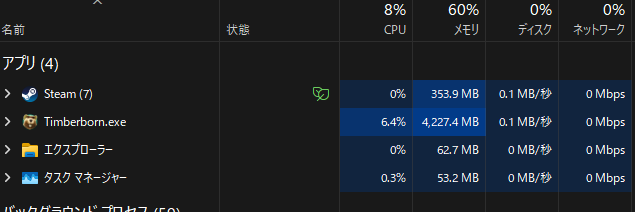
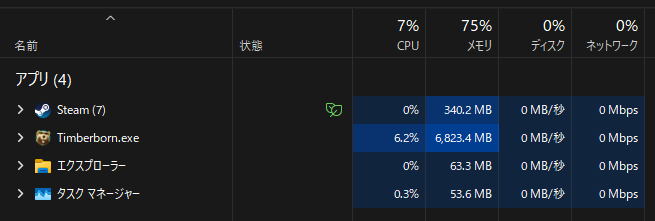
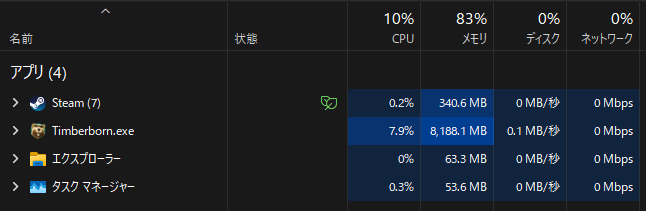
- All screenshots were taken using the same save file.
- In repeated load tests, Timberborn.exe memory usage increased roughly from 4.23 GB to 5.57 GB, then 6.82 GB, then 8.19 GB.
In all of these tests, I did not interact with the world after loading. I only returned to the main menu or reloaded the same save. This suggests the retained memory is related to save loading/unloading itself, not normal gameplay actions.
System information:
- OS: Windows 11 Home, version 25H2, build 26200.8037
- Installed RAM: 16 GB
- CPU: AMD Ryzen 7 5700X
- GPU: NVIDIA GeForce RTX 5060 Ti
- GPU driver version: 32.0.15.9186
- DirectX: 12 (FL 12.2)
This may be a regression of the previously reported save-loading memory issue.



-
11 Jan, '22
TechWizardI did a bit more testing and I am able to reproduce it consistently. Interestingly though, if you are loading up a second save and while it is loading furiously click the loading screen forcing the game to freeze up, (become white and Windows 10 complaining the game has become unresponsive) and wait for the game to respond, the RAM usage does decrease significantly to a bit more than baseline levels. This also seems to indicate that Windows is forcibly freeing up memory allocated to the game, which then gets reallocated but less than before because it does not need to load stuff it does not need but remained in memory. Therefore, I believe that the memory leak is related to not freeing up memory that is no longer needed.
-
16 Aug, '22
SapioitI found another way to replicate this:
4. Load a game, play the game for a sufficiently-long time, the game will eventually freeze and crash due to running out of memory.
My experience also indicates that the memory leak is caused by not freeing up memory which is no longer needed.
I should mention that I am using WIndows 7 x64 with 8 GB RAM. In the stable branch, it happens after a 1-3 hours after loading a save. After updating to the experimental mode and installing some mods, it happens after 30-60 minutes after loading a save.
Edit: Related thread: https://timberborn.featureupvote.com/suggestions/265946/memory-leak-in-experimental-mode
Edit2: it just occurred to me that the memory leak is likely caused by the garbage collection, which is lacking (incomplete or missing entirely) for some parts of the code. -
19 Jan
WilliWThis is still observable with experimental version v1.0.7.1. Every successive loading of a savegame eats around 2 GB of RAM.
@Sapioit Please do not mix two different scenarios with memory leaks. While this thread is about the leak caused by loading savegames, your comment is related to a leaking memory during continuous play. The latter may have been fixed, while the former still applies.
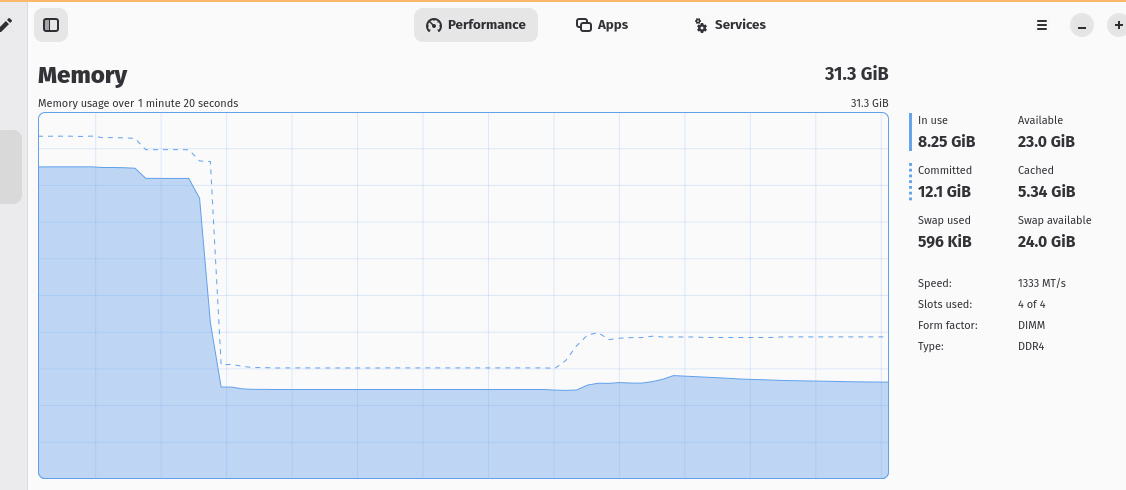
I attached a memory recording showing a situation where the game is terminated after having loaded multiple savegames in succession. The amount of ~20 GB is released on process termination.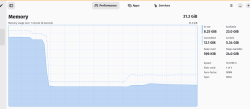
-
27 Jan
Gin Fuyou AdminPer developer's reply that not a memory leak but expected engine behaviour. It can be considered as problem only if actual OOM happens, otherwise memory is not being freed immediately is normal.
-
05 Apr
ONOGOROI can confirm that a very similar issue still happens on the current stable version with no mods installed.
Game version: v1.0.12.6-e293177
Mods: None
Reproduction steps:
1. Launch the game fresh and stay on the main menu.
2. Load a save.
3. After the map is loaded, do not perform any in-game actions at all.
4. Return to the main menu, or reload the same save.
5. Check Timberborn.exe memory usage in Windows Task Manager.
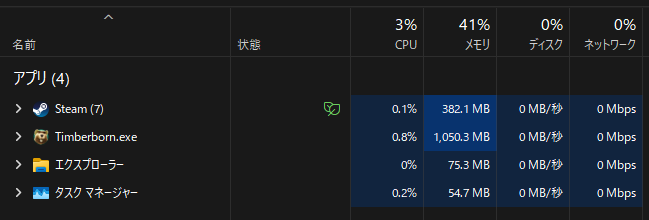
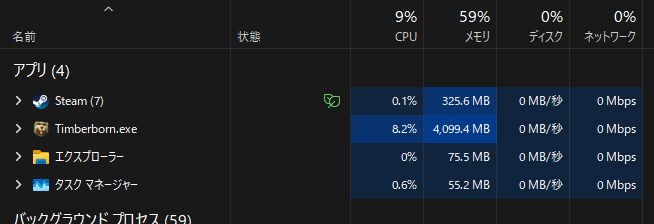
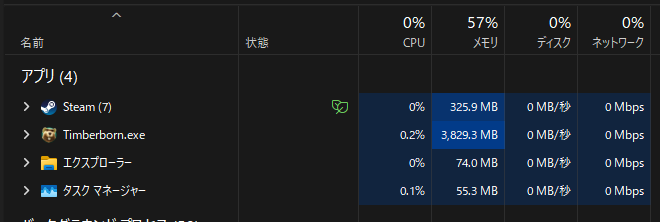
Observed behavior:
1. Memory is not properly released after returning to the main menu.
- Main menu right after launch: about 1.05 GB
- After loading the save: about 4.10 GB
- After returning to the main menu: about 3.83 GB